Preparing Simplified Chinese Web Sites
As the University emphasizes on bilingualism, and
has more collaboration with mainland institutions, there is a growing
demand for both Traditional and Simplified Chinese versions of our
web sites. A HanWEB real time translation server has been installed
in ITSC. It would be useful if you have a web site in Traditional
Chinese, and want to create and maintain a Simplified Chinese version
with minimal effort.
As a reminder, if departments are unsatisfied by the HanWEB automatic translation, they could create a simplified Chinese version of web content by themselves.
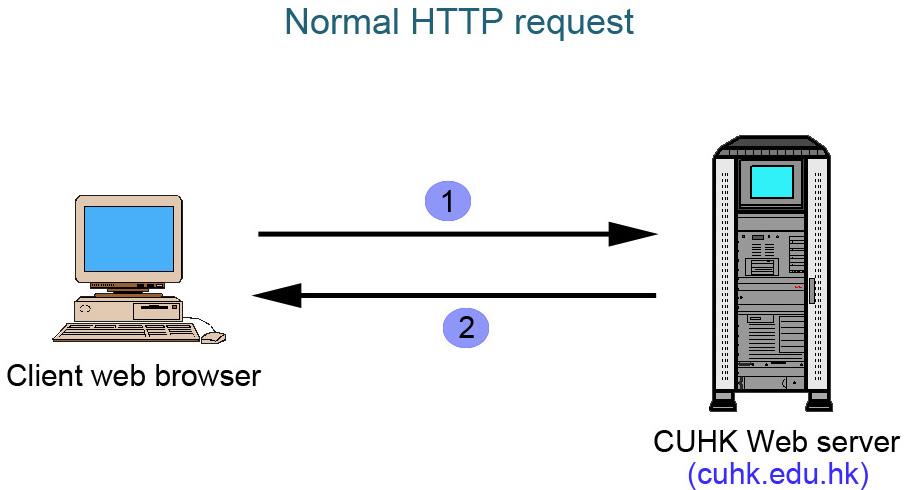
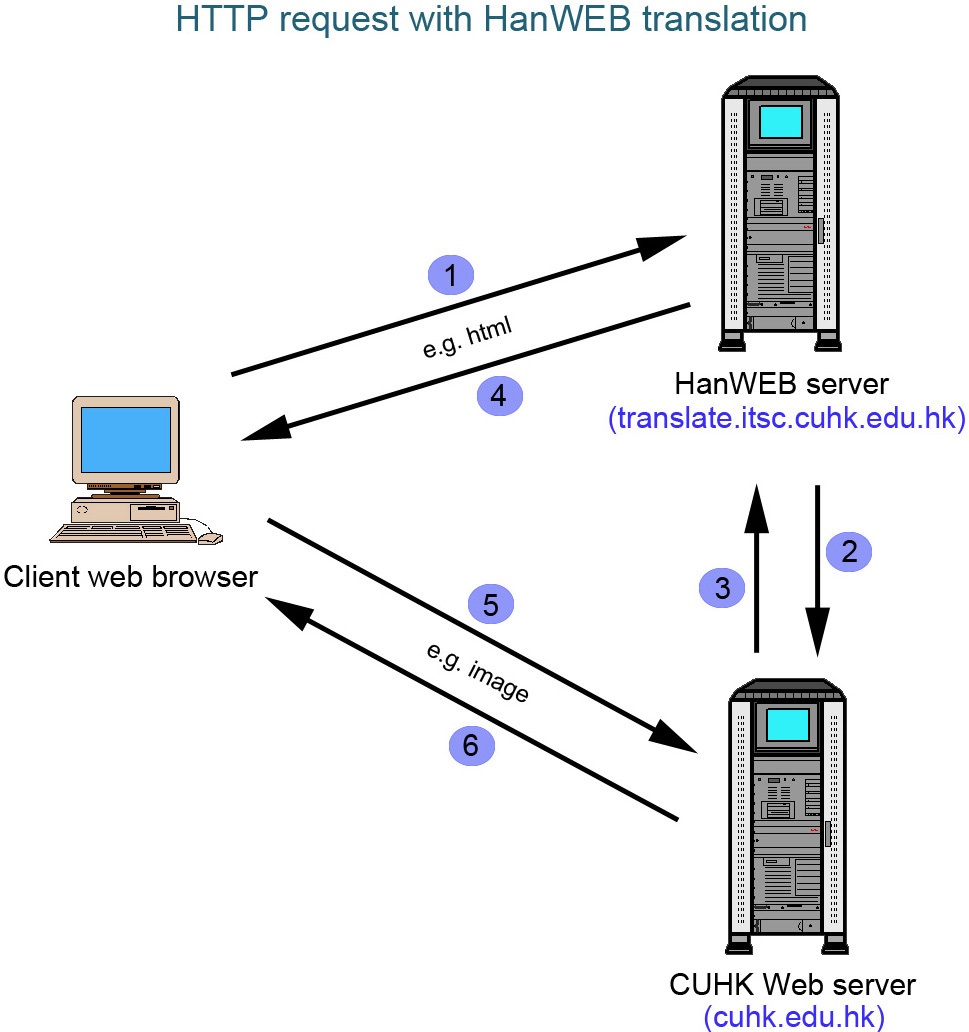
Architecture
Translation
- Add http://translate.itsc.cuhk.edu.hk/gb/ at the beginning of the URL to translate Traditional Chinese to
Simplified Chinese
- Add http://translate.itsc.cuhk.edu.hk/b5/ at the beginning of the URL to translate Simplified Chinese to
Traditional Chinese
- Add http://translate.itsc.cuhk.edu.hk/uniTS/ at the beginning of the URL to translate Traditional Chinese in
unicode to Simplified Chinese in unicode
- Add http://translate.itsc.cuhk.edu.hk/uniST/ at the beginning of the URL to translate Simplified Chinese in
unicode to Traditional Chinese in unicode
Examples
Followings are some notes and translation examples,
you may view the source html to compare the differences of the original
and translated web pages.
- Text
- Hyperlink
- Image
- PDF file
- Special terms
- Bypass
- Input form
- Translation
buttons (Please view the html source code to get the java
script for your reference.)
Point to be aware
- For heavily loaded system, it is not recommend
to use the translation server because the translation server may
not be able to handle the load and will become the bottleneck.
- For security reason, the translation server has
a non-CUHK IP address (i.e. non 137.189.). If your web page is
restricted to the 137.189 network, the translation server will
be unable to retrieve your pages, even when the end user is accessing
from the 137.189 network. Please consider allowing users to login
to your web site when they are accessing outside the 137.189 network.
- Only hosts end with cuhk.edu.hk will be served.
- Text - directly
translated
in Big5/GB2312
in unicode
Back to top of page
- Hyperlink - directly translated
Back to top of page
- Image (gif, jpg, png),
flash file (swf)
- You should prepare two sets of images, one for Traditional Chinese
(named with _xb5 at the end of each filename), one for Simplified
Chinese (named with _xgb at the end of each filename). HanWEB
will convert the file name i.e. _xb5 -> _xgb and vice versa.
- For the flash file, HanWEB don't realize the "value"
of an ojbect is a filename. Therefore, HanWEB fails to translate
swf file.
e.g.
<object classid="clsid:D27CDB6E-AE6D-11cf-96B8-444553540000"
codebase="http://download.macromedia.com/pub/shockwave/cabs/flash/swflash.cab#version=6,0,29,0"
width="180" height="110">
<param name="movie"
valuetype="ref" value="swf_xb5.swf">
<param name="quality"
value="high">
<embed src="swf_xb5.swf" quality="high"
pluginspage="http://www.macromedia.com/go/getflashplayer"
type="application/x-shockwave-flash" width="180"
height="110"></embed></object>
solution 1: add one more parameter into the object.
e.g.
<object classid="clsid:D27CDB6E-AE6D-11cf-96B8-444553540000"
codebase="http://download.macromedia.com/pub/shockwave/cabs/flash/swflash.cab#version=6,0,29,0"
width="180" height="110">
<param name="movie" valuetype="ref" value="swf_xb5.swf">
<param name="quality"
value="high">
<embed src="swf_xb5.swf" quality="high"
pluginspage="http://www.macromedia.com/go/getflashplayer"
type="application/x-shockwave-flash" width="180"
height="110"></embed></object>
solution 2: type the full path in the "value"
paramaeter.
e.g.
<object classid="clsid:D27CDB6E-AE6D-11cf-96B8-444553540000"
codebase="http://download.macromedia.com/pub/shockwave/cabs/flash/swflash.cab#version=6,0,29,0"
width="180" height="110">
<param name="movie" value="http://www.cuhk.edu.hk/internal/testkh/swf_xb5.swf">
<param name="quality"
value="high">
<embed src="swf_xb5.swf" quality="high"
pluginspage="http://www.macromedia.com/go/getflashplayer"
type="application/x-shockwave-flash" width="180"
height="110"></embed></object>
Back to top of page
- PDF file
You should prepare two sets of PDF files, one for Traditional Chinese
(named with _xb5 at the end of each filename), one for Simplified
Chinese (named with _xgb at the end of each filename). HanWEB
will convert the file name i.e. _xb5 -> _xgb and vice versa.
Back to top of page
- Special terms
Back to top of page
- Bypass
Back to top of page
- Input form
| Original form |
Translated form |
User input |
Server receive |
| B5 |
GB |
GB (same as the viewing version) |
B5 (same as the original version) |
| GB |
B5 |
B5 (same as the viewing version) |
GB (same as the original version) |
Back to top of page
Back to Assistance and Services Page
|